Wednesday, July 4, 2012

Root Huawei IDEOS u8800 CDMA

Handset ini adalah termasuk handphone android keluaran huawei yang tangguh dengan spesifikasi sebagai berikut diantaranya :


Dan ini adalah beberapa tata cara untuk me-root device ini :
1. Download B528_ROOT disini
2. Settings > Applications, check "Unknown sources"
3. Dial: *#*#2846579#*#*
4. pilih projectMenu > background settings > log settings > log switch > set Log on
5. pada menu yang sama masuk "dump and log" (centang semua yang ada)
6. Reboot/restart device
7. Settings > Applications > Development,  check "USB debugging"
8. Instal driver ADB disini caranya: (klik kanan computer/properties/device manager/android)
jika menggunakan W7 terbaca setelah klik B528_root.bat (klik kanan Run as admin) kemuadi HH reboot baru komputer/laptop mendeteksi device dan meminta driver android.
9. Tekan * # * # 2846579 # * # *
10. Reboot device dan set USB Debugging On
11. Download DooMLoRD Easy Rooting Toolkit disini lalu ekstrak
12. Tancapkan USB (jangan Turn On USB Storage) lalu jalankan runme.bat dari hasil ekstrak tadi. ikuti petunjuknya
13. Jika berhasil, Icon Superuser akan terinstall pada dan bisa dicheck pada menu

MT65xx Preloader Android Phones Repair Flasher

This is how to hard reset your china phone which is used MT65xx Chipset, resetting this handset is very useful when you forgot your pattern password, feel slow doing something in your phone, restoring your configuration to normal, repair your system file, and anything else.


How to do hard reset :
1. Connect the cable from the computer while holding down the "-" - the volume below the sidebar.
2. Turn on your phone
3. Phone will boot in FACTORY MODE
4. Select the Clear Flash using the same button "-"
5. Confirmed by pressing the button "Menu" button on the left touch of a round button. 


Some information that can help you for this device
- Entering the engineering menu by dial *#*#3646633#*#*


Hope this article could help you for something :)
source : Here

Tuesday, December 21, 2010

Simple Stopwatch built in VB.NET [Open Source]

Stopwatch is a tool used to measure the length of time spent in the activity. Among others, the timing of testing tools that require time to millisecond accuracy in the laboratory, as well as on race neighborhood.

It was originally built for personal use when testing a device that relate to my daily work, but this time I hope can be useful not only for myself personally, as well as for others in need

Thefollowing is a stopwatch application interface  which is built using VB.Net, developed using Visual 2005, by using a form as interface design and equipped with several buttons and layout of the output value of the split time.

Dim startTime As DateTime
Private Sub BtnGo_Click(ByVal sender As System.Object, ByVal e As System.EventArgs) Handles BtnGo.Click
If (Timer.Enabled) Then
BtnGo.Text = "Start"
Timer.Stop()
Else
startTime = DateTime.Now()
BtnGo.Text = "Stop"
Timer.Start()
End If
End Sub


Private Sub Timer_Tick(ByVal sender As Object, ByVal e As System.EventArgs) Handles Timer.Tick
Dim span As TimeSpan = DateTime.Now.Subtract(startTime)
LabelAngka.Text = extZero(span.Hours.ToString) & ":" & extZero(span.Minutes.ToString) & ":" & _
extZero(span.Seconds.ToString)
LabelMilisecond.Text = span.Milliseconds
End Sub


Function extZero(ByVal binNum As String)
Dim ext As String = "0"
Dim HexToBin As String = ""
If binNum.Length < 2 Then Dim k As Integer = 1 Dim len As Integer = 2 - (binNum.Length + 1) For k = 1 To len ext = ext & "0" Next k HexToBin = ext + binNum ElseIf binNum.Length = 2 Then HexToBin = binNum End If Return HexToBin End Function Private Sub BtnClear_Click(ByVal sender As System.Object, ByVal e As System.EventArgs) Handles BtnClear.Click Timer.Enabled = False LabelAngka.Text = "00:00:00" LabelMilisecond.Text = "000" BtnGo.Text = "Start" MemoEdit1.Text = "" End Sub Private Sub BtnSplit_Click(ByVal sender As System.Object, ByVal e As System.EventArgs) Handles BtnSplit.Click Dim nil As String = LabelAngka.Text & "." & LabelMilisecond.Text Dim daftar As String = MemoEdit1.Text If daftar = "" Then daftar = nil ElseIf daftar.Length > 1 Then
daftar = daftar + vbNewLine + nil
End If
MemoEdit1.Text = daftar
End Sub

And above is the source code used in this application, there are several procedures and functions used in this application.
That's all from me, with hopes to be useful to others. Thank you:)


Friday, December 17, 2010

Secure and Password your "secret files" with Easy without Additional Applications

Confidential files is one of the properties worth in the form of data, for those who need high privacy in terms of security to prevent free access from others who are far away from the rights and interests,

Confidential files are always placed in a special place that is in the folder / drive tyertentu, kept away from public places for other people's hard to find the secret files.

However, the function "search" on the computer, will facilitate the confidential files was discovered, until he could be a dangerous thing.

But there is an easy way to secure the secret files, using a simple script, without any software or other additional applications. function of this script is to hide our secret files on the place we know and can only be accessed using a password that is only we who know.

Code:
Quote:
Quote: cls
@ECHO OFF
title Folder FolderAman
if EXIST "Control Panel.{21EC2020-3AEA-1069-A2DD-08002B30309D}" goto UNLOCK
if NOT EXIST FolderAman goto MDLOCKER
:CONFIRM
echo Are you sure you want to lock the folder(Y/N)
set/p "cho=>"
if %cho%==Y goto LOCK
if %cho%==y goto LOCK
if %cho%==n goto END
if %cho%==N goto END
echo Invalid choice.
goto CONFIRM
:LOCK
ren FolderAman "Control Panel.{21EC2020-3AEA-1069-A2DD-08002B30309D}"
attrib +h +s "Control Panel.{21EC2020-3AEA-1069-A2DD-08002B30309D}"
echo Folder locked
goto End
:UNLOCK
echo Enter password to unlock folder
set/p "pass=>"
if NOT %pass%== KUNCI goto FAIL
attrib -h -s "Control Panel.{21EC2020-3AEA-1069-A2DD-08002B30309D}"
ren "Control Panel.{21EC2020-3AEA-1069-A2DD-08002B30309D}" FolderAman
echo Folder Unlocked successfully
goto End
:FAIL
echo Invalid password
goto end
:MDLOCKER
md FolderAman
echo FolderAman created successfully
goto End
:End

Create a file. TXT and copy the code above, save with the name "kunci.bat", to the password can be changed, by changing the script in red

The script above, can also be downloaded in the form of a file so,
HERE

Ways of working to secure confidential files is as follows,
1. when the script "kunci.bat" is executed, it will create a folder "FolderAman"
2. store or place your confidential files in the folder,
3. longer execution script "kunci.bat", then there will be a key confirmation Y / N, (Y for the key, N to ignore),

how to access the confidential files is as follows,
1. execution script "kunci.bat", then there will be a confirmation to enter your password,
2. then the folder "FolderAman" will appear, and your confidential files ready for use.

Explanation of the main procedure script,
1. script using "Control Panel. {21EC2020-3AEA-1069-A2DD-08002B30309D}" as a safe address on windows, that if the address is accessed, will lead to the control panel,
2. script will add the attribute on a folder (+ h + s), so the folder will disappear because the default settings on a computer folder options is "do not show hidden files"

May be useful for readers and writers. Thank you


Thursday, December 2, 2010

Factorial Calculator using VB.Net

As I know, in mathematics, the factorial of n natural numbers is the result of multiplication of positive integers less than or equal to n. Factorial is written as n! and is called n factorial.
For example, 7! is worth 7 × 6 × 5 × 4 × 3 × 2 × 1 = 5040. The following is a list of factorial:

various ways used to facilitate this process, including the use of a calculating machine. among many calculating machines or can be called by the application, I will build a calculating machine using VB.Net programming language, reason, among others, language is relatively easy to understand and implement.

on interface design, users only need to enter the factorial value to be calculated, then this application will automatically calculate, and display the results directly.

on the programming side of the mathematical computation process is relatively easily understood and implemented.I hope this application can be useful and beneficial to readers. thank you:)
Read more for details and download the source code program the source code program can be download here


this is the interface design, users only need to enter the factorial value to be  calculated, then this application will automatically calculate, and display  the results directly.


Wednesday, December 1, 2010

Online Code Translator From VB.NET to C# and vice versa

This service will translate the code for you, just start typing the code or upload a file to convert it.
For now it only supports from VB.NET to C# and from C# to VB.NET.
To use it you can either:
1. Start typing your code.
2. Copy and Paste the code in the Code Text Box.
3. Translate an entire file using the file upload

base on my experience use this application, this application in helpful and easy to use, even newbie can use this application easily, it's recomended,
This application can be access HERE


Binary to Decimal Converter using VB.Net

This application was developed with the aim to convert binary format into a decimal numbers format, this simple and mini application was developed with VB programming language and using Visual Studio 2005.

binary to decimal number conversion application is based on the experience when I woke up also find references to the internet about this conversion code, starting from there I developed a counter application numbers and hexadecimal to binary conversion in accordance with our needs.

Read More to download this application,

this application can be download HERE

Hexadecimal to Binary Converter using VB.NET

This application was developed with the aim to convert numbers to hexadecimal format into a binary format, a simple application and the mini was developed with VB programming language and using Visual Studio 2005.

Hex to binary conversion application is based on the experience when I woke up also find references to the internet about this conversion code, I found it on the site visualbasiccode , starting from there I developed a counter application numbers and hexadecimal to binary conversion in accordance with our needs.

Read More to download this application,

this application can be download HERE

Tuesday, November 9, 2010

Aplikasi Konverter Satuan SI Sederhana Menggunakan VB.Net

Berdasar WIKI, definisi dari Sistem Satuan Internasional ini sendiri adalah "(nama aslinya dalam bahasa Perancis: Système International d'Unités atau SI) adalah sistem satuan atau besaran yang paling umum digunakan. Pada awalnya sistem ini merupakan sistem MKS, yaitu panjang (meter), massa (kilogram), dan waktu (detik/sekon). Sistem SI ini secara resmi digunakan di semua negara di dunia kecuali Amerika Serikat (yang menggunakan Sistem Imperial), Liberia, dan Myanmar.[1]

Dalam sistem SI terdapat 7 satuan dasar/pokok SI dan 2 satuan tanpa dimensi. Selain itu, dalam sistem SI terdapat standar awalan-awalan (prefix) yang dapat digunakan untuk penggandaan atau menurunkan satuan-satuan yang lain."

7 satuan dasar/pokok SI adalah sebagai berikut :
* Meter untuk panjang (m, l)
* Kilogram untuk massa (kg, m)
* Sekon untuk waktu (s, t)
* Ampere untuk arus listrik (A, i)
* Kelvin untuk suhu (K, T)
* mol untuk jumlah molekul (mol, n)
* Kandela untuk intensitas cahaya (cd, j)

dari data diatas, saya coba buat aplikasi sederhana untuk konversi data panjang yaitu satuan Meter, pada aplikasi ini terjadi pengalian maupun pembagian sederhana berdasarkan tingkatan level tangga dari gambar berikut,


dari gambar diatas, bisa diketahui bahwa apabila, nilai satuan mengalami downgrade level, maka akan dikalian 10 tiap kali turun, dan dibagi 10 pula untuk masing-masing upgrade level
berikut aplikasi yang saya bangun beserta interface dari aplikasinya,


gambar diatas adalah tatap muka utama dari aplikasi yang saya kembangkan, dihalaman itu terdapat 1 input yaitu, input nilai yang akan dikonversi, sedangkan untuk 2 buah dropdown disana adalah satuan awal nilai, dan satuan akhir hasil yang diinginkan


diatas adalah fungsi untuk menentukan range tangga, yang nantinya akan dimanfaatkan sebagai penghitung banyaknya jumlah pengali


sedangkan untuk gambar diatas adalah, fungsi untuk menentukan besaran pengalinya, dimana fungsi ini adalah turunan pemanfaatan dari fungsi sebelumnya.

sekian aplikasi mini, tiny, dan sederhana ini,hehe..
semoga dapat bermanfaat, DISINI. (Dalam Pengembangan) Wassalam :)

Konversi File .DM ke .MP3

File dengan format DM umumnya file audio dilengkapi dengan copy-perlindungan. Dikenal sebagai file manajemen digital, file dengan format ini dapat dibaca sebagai file format MP3 sehingga lebih bermanfaat untuk pembakaran ke CD atau untuk digunakan dengan pemutar audio pribadi.

Berikut adalah cara-cara agar file dengan format DM dapat dibaca sebagai file dengan format MP3 :
1. pada explorer, buka Tools > Folder Options, maka akan keluar window seperti ini,


pada gambar diatas, lakukan uncheck (V) pada "Hide extentions for known file types", sehingga ekstensi file akan terlihat

2. contoh pada file test.DM maka, file hanya butuh di-rename menjadi test.MP3
3. setelah itu file akan dapat di-play langsung menggunakan player MP3 biasa, seperti winamp
4. jadi tanpa aplikasi konverter, untuk itu selamat mencoba :)

Thursday, October 28, 2010

Aplikasi Pencacah Bilangan Konversi Hex ke Binary menggunakan VB.NET

Aplikasi ini dikembangkan dengan tujuan untuk mengkonversi bilangan dengan format hexadesimal ke dalam bentuk format binary, aplikasi sederhana dan mini ini dikembangkan dengan bahasa program VB dan menggunakan Visual Studio 2005.

Aplikasi konversi hexa ke binary ini saya bangun berdasarkan pengalaman saat juga mencari referensi diinternet mengenai kode konversi ini, saya menemukannya di situs visualbasiccode, bertolak dari sana saya kembangkan menjadi aplikasi pencacah bilangan dan konversi hexa ke binary sesuai dengan kebutuhan saya.

berikut tampilan interface yang nantinya full/seluruh kode saya lampirkan agar bisa saling berbagi, pengalaman :)


pada gambar diatas adalah tampilan halaman aplikasi pencacah bilangan dan konversi hex ke bentuk binary,


untuk gambar diatas ini adalah contoh bilangan hexa yang akan dicacah lalu di konversi ke bentuk binary yang hasilnya bisa dilihat pada richtextbox yang juga ada pada gambar diatas,


sedangkan berikut gambar ini adalah code yang saya gunakan pada saat proses konversi dari hexa ke bentuk binary, kode ini saya dapatkan dari situs visualbasiccode,


untuk kode diatas adalah kode yang saya kembangkan sendiri yaitu, kode untuk menambahkah angka 0 (nol) pada hasil konversi binary, karena pada hasil konversi kode sebelumnya, nilai yang dihasilkan tidak sesuai dengan jumlah bit yang seharusnya yaitu 8 bit, maka apabila hasil konversi nilai hexa 2 yang seharusnya 10 maka akan dipenuhkan menjadi 00000010,


ini adalah gambar terakhir yang saya lampirkan, yaitu untuk memenggal atau mencacah bilangan hexa yang dikonversi per 2 digit, jadi jika ada bilangan hexa 01 02 maka, akan muncul di aplikasi hasil konversi masing-masing dari 2 digit yaitu konversi untuk 01 dan konversi untuk 02,

DISINI, Sekiranya cukup sekian share dari saya, semoga bermanfaat, terus berbagi selalu semangat, terima kasih untuk referensi kodenya dari visualbasiccode :)

Friday, March 19, 2010

Aplikasi Test Buta Warna (Ishihara) Menggunakan VB.Net

Terinspirasi dari pengalaman saya saat test masuk kerja pada satu perusahaan BUMN pada akhir Januari 2010 ini. Saat itu saya mencapai tahap hampir akhir dari rangkaian tahap-tahap lain sebelumnya. Tahap itu adalah test kesehatan, salah satu materi test kesehatan itu adalah test kesehatan mata.

Saat itu si dokter cantik (krena dokterny emng cew,klo cow ga mngkin kan cntik :p) memeriksa mata saya menggunakan senter untuk melihat dalam mata saya (ga tau jg apa sbnernya yg dlihat) yang pasti saat itu, jarak wajah si dokter itu hanya bberapa centimeter saja dari wajah saya (ampir nempel..hooo) deg-deg'an, maklum bukan muhrimnya,,hhe.

setelah itu, disuruh membaca huruf-huruf,
dokter brkata: "gmn, bisa membacanya?"(si dokter mnutup 1 mata saya dgn tngannya)
saya: "wah, ga bisa dok!"
dokter: "hmm..ternyata bahaya"(krena blm smpat 1 huruf pun saya bisa baca, mngkin dkira dokter saya buta huruf atau bgitu parahny sakit mata,,hoo)
saya: "iya dok, ga bisa kebaca sama sekali,,soalny tangan dokter jg mnutupi mata saya yg 1'nya lagi.. :p" :hammer:

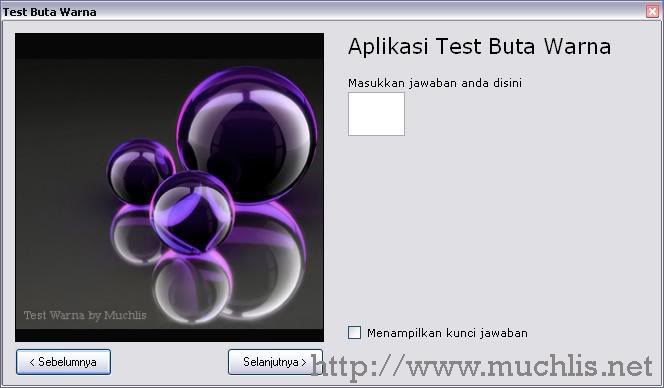
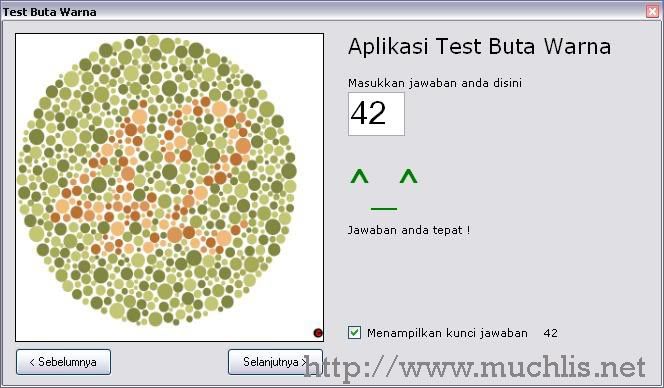
Setelah itu baru test buta warna, dan dari itu kebayang coba bikin aplikasi buta warna sendiri. Begini interface sederhana dari aplikasi sederhana saya ini:


Aplikasi ini memanfaatkan gambar-gambar yang ada di Internet, saya download trus saya gunakan sebagai materi pengetesan.
Aplikasi ini juga saya lengkapi dengan kunci jawaban yang bisa digunakan dengan men-"check" menu "lihat kunci jawaban" yang ada dibagian kanan bawah aplikasi.


Juga terdapat tombol "Sebelumnya" dan "Berikutnya" untuk mengganti gambar-gambar yang akan ditampilkan, saya hanya menggunakan metode random untuk tombol "Berikutnya" dan menggunakan arraylist untuk tombol "Sebelumnya"


Aplikasi ini juga saya upload pada menu "My Shared Files" pada blogsite saya ini juga, jika mungkin sewaktu-waktu ada yang butuh dengan nama file "TestButaWarna.rar" hanya berupa file (.exe)-nya saja. Namun jika ada yang butuh sourcecodenya yang agak besar ukurannya, menyusul akan saya upload juga dengan nama file "TestButaWarna(All).rar". Semoga dapat bermanfaat, Terima kasih


Thursday, February 11, 2010

Calculator Mini Menggunakan VB.Net

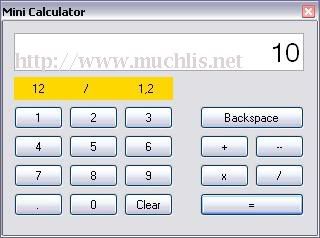
Kalkulator adalah alat hitung elektronik yang membantu penggunanya untuk menemukan solusi perhitungan sederhana. Pada kesempatan kali ini, saya mencoba membuat sebuah aplikasi ringan tentang kalkulator mini. Kalkulator ini hanya mampu menyelesaikan perhitungan-perhitungan sederhana. Aplikasi kalkulator ini saya bangun menggunakan bahasa pemrograman VB.Net. Aplikasi kalkulator yang saya bangun memiliki tampilan halaman seperti ini:


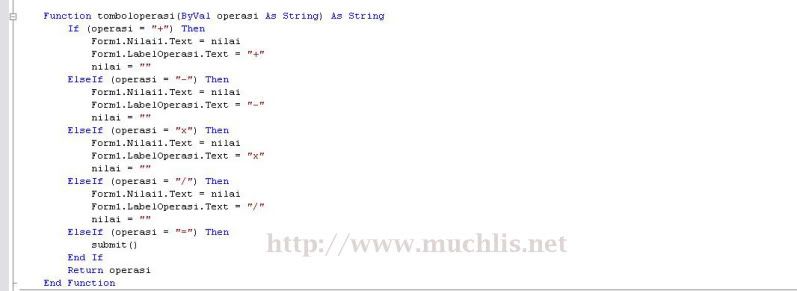
Pada pemrogramannya, seluruh fungsi perhitungan saya letakkan pada modul. Sehingga kode pada halaman program hanya berupa fungsi untuk memanggil dan melakukan perintah perhitungan. Berikut adalah tampilan sebagian kode yang saya ambil dari modul (mdlTombol) yang berisi fungsi-fungsi perhitungan.


Source Code Aplikasi dapat didownload DISINI. Semoga contoh aplikasi berikut dapat bermanfaat bagi pembaca maupun penggunanya. Amin :D


Wednesday, January 13, 2010

Menentukan Nama Hari dengan Bahasa Indonesia pada VB.Net

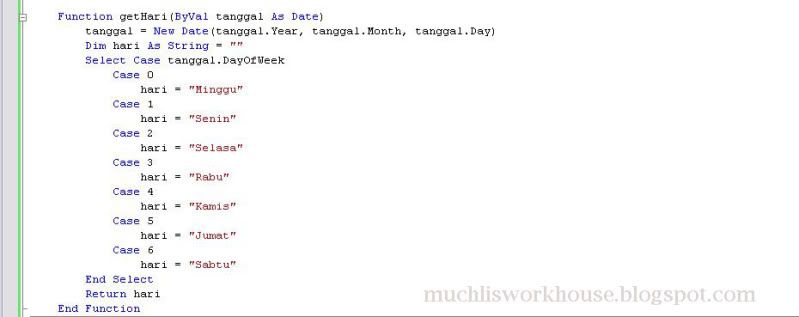
Menentukan nama hari pada suatu tanggal tertentu menggunakan bahasa Indonesia, mungkin cara ini [coding program menggunakan VB.Net] bisa digunakan untuk kita-kita para newbiers :D. Algoritma pada program yang saya buat ini adalah sebagai berikut :
1. menentukan tanggal yang akan kita cari nama harinya [dalam bahasa Indonesia]


2. value dari tanggal tersebut berupa integer [kita pakai dayofweek] yang nanti kita akan cocokkan dengan nama hari yang ada menggunakan "case"


3. hasil pencocokan akan dikembalikan dalam format string [nama hari]


Source Code Aplikasi dapat didownload DISINI


Sunday, January 3, 2010

Menghitung Hari Libur pada VB.Net

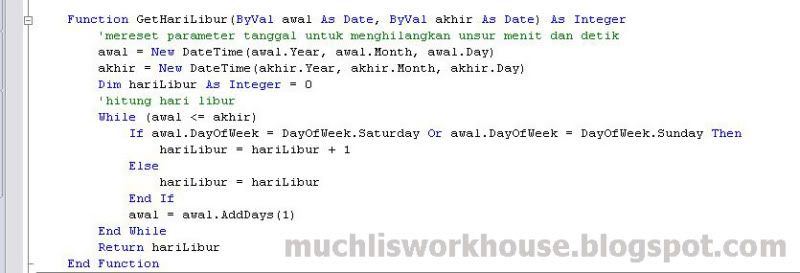
Mumpung masih musim libur, iseng-iseng bikin fungsi pemrograman yang sebenarnya hanya memodifikasi fungsi yang pernah saya posting pada artikel sebelumnya "Menghitung Hari Kerja pada VB.Net". Fungsi kali ini hanya kebalikannya saja, yaitu menghitung Hari Libur. Terkadang fungsi juga digunakan saat-saat perhitungan jumlah masa suatu waktu yang kelak nantinya bermamfaat untuk penghitungan jumlah gaji(aplikasi penggajian), denda(aplikasi perpustakaan) atau apa saja. berikut adalah fungsinya yang saya bangun menggunakan bahasa pemrograman VB.Net yang didevelop menggunakan Visual Studio 2005:


Gambar diatas adalah fungsi yang akan menghitung jumlah hari libur (hanya hari sabtu dan minggu) pada suatu periode waktu yang ditentukan.


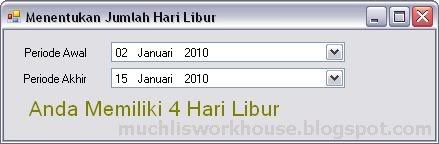
Dan untuk gambar diatas ini adalah terdiri atas 2 buah sub dengan penjelasan sebagai berikut :
1. sub Hitung: sebagai prosedur untuk memasukkan nilai (periode awal dan periode akhir) yang nantinya akan dihitung oleh fungsi GetHariLibur
2. sub DateTimePickerTglAkhir_ValueChanged: sebagai prosedur yang memanfaatkan event dari dateTimePickerTglAkhir, sehingga tiap kali berganti periode tanggal akhir, maka fungsi akan otomatis menghitung jumlah hari libur pada periode tersebut.


Berikut sedikit penjelasan singkat mengenai interface dan kegunaan dari aplikasi kecil diatas, semoga dapat bermanfaat :).

Terima Kasih.

Source Code Aplikasi dapat didownload DISINI


Thursday, December 31, 2009

Menambahkan Header Report (langsung dari Table Grid) Tanpa Membuat Form Report Tersendiri

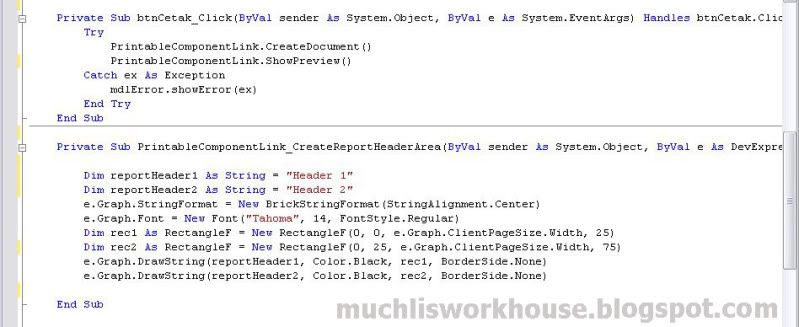
Menambahkan Header atau Kop pada sebuah report/laporan tanpa membuat halaman report tersendiri studi kasus VB.Net yang menggunakan komponen DevExpress (Visual Studio 2005).

sebuah tabel yang ingin dicetak tanpa membuat halaman report tersendiri (exp: KLASIFIKASIGridControl.ShowPrintPreview()) maka halaman report akan tampil tanpa header (kita terpaksa menambahkan manual). Apabila kita ingin menambahkan header/kop halaman report secara otomatis, maka kita memerlukan beberapa baris kode sebagai berikut...


Penjelasan gambar diatas adalah string "ReportHeader1" dan "ReportHeader2" diatas akan tampil sebagai header report yang akan dipreview,,dimana header diatas akan memiliki tulisan "Header 1"(atas) dan "Header 2"(bawah) dengan properties font yaitu regular(Tahoma), posisi tengah(Center), warna huruf Hitam.
Untuk lebih jelas silahkan bertanya, maaf jika bahasanya sulit dicerna hehe..basic untuk menjadi gurunya kurang


Menghitung Hari Kerja pada VB.Net

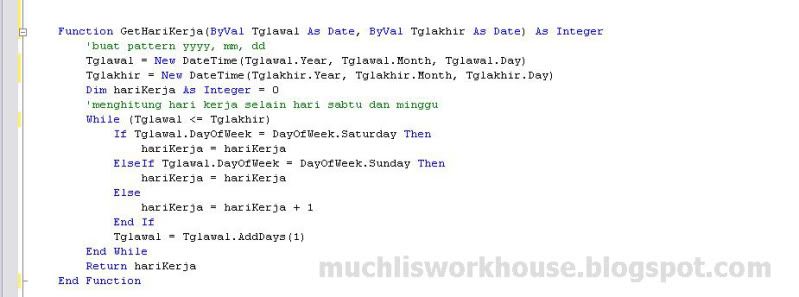
Menghitung jumlah hari kerja adalah suatu hal yang kerap kali dipakai dalam bahasa pemrograman, untuk contoh kasus pada proses penentuan jumlah hari kerja seorang pekerja dalam suatu periode waktu atau untuk penghitungan lainnya sekedar share bagi yang butuh, berikut adalah contoh fungsinya pada VB.Net


Dalam penggunaannya dalam proses penghitungan, berikut adalah cara memanggil fungsi tersebut, dimana variabel hr akan mengambil nilai dari hasil perhitungan fungsi tersebut. Fungsi diatas GetHariKerja diatas bisa didownload di widget "My Shared Files" Blog ini dengan nama file "GetHariKerja.rar"


Tgl_kembaliDateEdit.DateTime ::: adalah nilai tanggal periode awal
Tgl_pengembalianDateEdit.DateTime ::: adalah nilai tanggal periode akhir

Source Code Aplikasi dapat didownload DISINI

Sunday, December 20, 2009

What is Computer Hacking

Computer hacking is the practice of modifying computer hardware and software to accomplish a goal outside of the creator’s original purpose. People who engage in computer hacking activities are often called hackers. Since the word “hack” has long been used to describe someone who is incompetent at his/her profession, some hackers claim this term is offensive and fails to give appropriate recognition to their skills.

Computer hacking is most common among teenagers and young adults, although there are many older hackers as well. Many hackers are true technology buffs who enjoy learning more about how computers work and consider computer hacking an “art” form. They often enjoy programming and have expert-level skills in one particular program. For these individuals, computer hacking is a real life application of their problem-solving skills. It’s a chance to demonstrate their abilities, not an opportunity to harm others.

Since a large number of hackers are self-taught prodigies, some corporations actually employ computer hackers as part of their technical support staff. These individuals use their skills to find flaws in the company’s security system so that they can be repaired quickly. In many cases, this type of computer hacking helps prevent identity theft and other serious computer-related crimes.

Computer hacking can also lead to other constructive technological developments, since many of the skills developed from hacking apply to more mainstream pursuits. For example, former hackers Dennis Ritchie and Ken Thompson went on to create the UNIX operating system in the 1970s. This system had a huge impact on the development of Linux, a free UNIX-like operating system. Shawn Fanning, the creator of Napster, is another hacker well known for his accomplishments outside of computer hacking.

In comparison to those who develop an interest in computer hacking out of simple intellectual curiosity, some hackers have less noble motives. Hackers who are out to steal personal information, change a corporation’s financial data, break security codes to gain unauthorized network access, or conduct other destructive activities are sometimes called “crackers.” This type of computer hacking can earn you a trip to a federal prison for up to 20 years.

If you are interested in protecting your home computer against malicious hackers, investing in a good firewall is highly recommended. It’s also a good idea to check your software programs for updates on a regular basis. For example, Microsoft offers a number of free security patches for its Internet Explorer browser.

What is Software Cracking

Software cracking is the modification of software to remove protection methods: copy protection, trial/demo version, serial number, hardware key, date checks, CD check or software annoyances like nag screens and adware.

The distribution and use of cracked copies is illegal in almost every developed country. There have been many lawsuits over cracking software, but most had to do with the distribution of the duplicated product rather than the process of defeating the protection, due to the difficulty of constructing legally sound proof of individual guilt in the latter instance. In the United States, the passing of the Digital Millennium Copyright Act (DMCA) legislation made software cracking, as well as the distribution of information which enables software cracking, illegal. However, the law has hardly been tested in the U.S. judiciary in cases of reverse engineering for personal use only. The European Union passed the European Union Copyright Directive in May 2001, making software copyright infringement illegal in member states once national legislation has been enacted pursuant to the directive.

History

The first software copy protection was on early Apple II, Atari 800 and Commodore 64 software. Game publishers, in particular, carried on an arms race with software crackers. Over time, publishers have resorted to increasingly complex countermeasures to try to stop unauthorized copying of their software.

Unlike modern computers that use standardized drivers to manage device communications, the Apple II DOS directly controlled the step motor that moves the floppy drive head, and also directly interpreted the raw data (known as nibbles) read from each track to find the data sectors. This allowed complex disk-based software copy protection, by storing data on half tracks (0 1 2.5 3.5 5 6...), quarter tracks (0 1 2.25 3.75 5 6...), and any combination thereof. In addition tracks did not need to be perfect rings, but could be sectioned so that sectors could be staggered across overlapping offset tracks, the most extreme version being known as spiral tracking. It was also discovered that many floppy drives do not have a fixed upper limit to head movement, and it was sometimes possible to write an additional 36th track above the normal 35 tracks. The standard Apple II DOS copy programs could not read such protected floppy disks, since the standard DOS assumed all disks had a uniform 35 track, 13 or 16 sector layout. Special nibble-copy programs such as Locksmith and Copy II Plus could sometimes duplicate these disks by using a reference library of known protection methods, but when protected programs were cracked they would be completely stripped of the copy protection system, and transferred onto a standard DOS disk that any normal Apple II DOS copy program could read.

One of the primary routes to hacking these early copy protections was to run a program that simulates the normal CPU operation. The CPU simulator provides a number of extra features to the hacker, such as the ability to single-step through each processor instruction and to examine the CPU registers and modified memory spaces as the simulation runs. The Apple II provided a built-in opcode disassembler, allowing raw memory to be decoded into CPU opcodes, and this would be utilized to examine what the copy-protection was about to do next. Generally there was little to no defense available to the copy protection system, since all its secrets are made visible through the simulation. But because the simulation itself must run on the original CPU, in addition to the software being hacked, the simulation would often run extremely slowly even at maximum speed.

The most common protection method on the Atari computers were "bad sectors". These were sectors on the disk that were intentionally unreadable by the disk drive. The software would look for these sectors when the program was loading and would stop loading if an error code was not returned when accessing these sectors. Special copy programs were available that would copy the disk and remember any bad sectors. The user could then use an application to spin the drive by constantly reading a single sector and display the drive RPM. With the disk drive top removed a small screwdriver could be used to slow the drive RPM below a certain point. Once the drive was slowed down the application could then go and write "bad sectors" where needed. When done the drive RPM was sped up back to normal and an uncracked copy was made. Of course cracking the software to expect good sectors made for readily copied disks without the need to meddle with the disk drive. As time went on more sophisticated methods were developed, but almost all involved some form of malformed disk data, such as a sector that might return different data on separate accesses due to bad data alignment. Products such as the "Happy Chip" became available that were hardware add-ons similar to today's game console modchips. However, the Happy Chip would allow the user to make exact copies of the original program with copy protections in place on the new disk. "Happy Chip" owners quickly became popular in game trading circles.

On the Commodore 64, several methods were used to copy protect software. For software distributed on ROM cartridges, subroutines were created that attempted to write to the ROM. If nothing happened, the presence of a ROM cartridge was verified, but if the software had been moved to RAM, the write routine would disable the software. Because of the operation of Commodore floppy drives, some write protection schemes would cause the floppy drive head to bang against its top and could cause the drive head to become misaligned. In some cases, cracked versions of software were desirable to avoid this result.

Most of the early software crackers were computer hobbyists who often formed groups that competed against each other in the cracking and spreading of software. Breaking a new copy protection scheme as quickly as possible was often regarded as an opportunity to demonstrate one's technical superiority rather than a possibility of money-making. The cracker groups of the 1980s started to advertise themselves and their skills by attaching animated screens known as crack intros in the software programs they cracked and released. Once the technical competition had expanded from the challenges of cracking to the challenges of creating visually stunning intros, the foundations for a new subculture known as demoscene were established. Demoscene started to separate itself from the illegal "warez scene" during the 1990s and is now regarded as a completely different subculture. Many software crackers have later grown into extremely capable software reverse engineers; the deep knowledge of assembly required in order to crack protections enables them to reverse engineer drivers in order to port them from binary-only drivers for Windows to drivers with source code for Linux and other free operating systems.

With the rise of the Internet, software crackers developed secretive online organizations.

Most of the elite, or well known cracking groups make software cracks entirely for respect in "The Scene", not Profit. From there, the cracks are eventually leaked onto public internet sites by people/crackers who use the well protected/secure FTP release archives, and are made into pirated copies and sold illegally by other third parties.

The Scene today is formed of small groups of very talented people, who more or less compete to have the more genius crackers, and methods of cracking and reverse engineering.

Methods

The most common software crack is the modification of an application's binary to cause or prevent a specific key branch in the program's execution. This is accomplished by reverse engineering the compiled program code using a debugger such as SoftICE, OllyDbg, GDB, or MacsBug until the software cracker reaches the subroutine that contains the primary method of protecting the software (or by disassembling an executable file with a program such as IDA). The binary is then modified using the debugger or a hex editor in a manner that replaces a prior branching opcode with its complement or a NOP opcode so the key branch will either always execute a specific subroutine or skip over it. Almost all common software cracks are a variation of this type. Proprietary software developers are constantly developing techniques such as code obfuscation, encryption, and self-modifying code to make this modification increasingly difficult.

A specific example of this technique is a crack that removes the expiration period from a time-limited trial of an application. These cracks are usually programs that patch the program executable and sometimes the .dll or .so linked to the application. Similar cracks are available for software that requires a hardware dongle. A company can also break the copy protection of programs that they have legally purchased but that are licensed to particular hardware, so that there is no risk of downtime due to hardware failure (and, of course, no need to restrict oneself to running the software on bought hardware only).

Another method is the use of special software such as CloneCD to scan for the use of a commercial copy protection application. After discovering the software used to protect the application, another tool may be used to remove the copy protection from the CD or DVD. This may enable another program such as Alcohol 120%, CloneDVD, Game Jackal, or Daemon Tools to copy the protected software to a user's hard disk. Popular commercial copy protection applications which may be scanned for include SafeDisc and StarForce. [1]

In other cases, it might be possible to decompile a program in order to get access to the original source code or code on a level higher than machine code. This is often possible with scripting languages and languages utilizing JIT compilation. An example is cracking (or debugging) on the .NET platform where one might consider manipulating CIL to achieve one's needs. Java's bytecode also works in a similar fashion in which there is an intermediate language before the program is compiled to run on the platform dependent machine code.

Advanced Reverse engineering for Protections such as Securom, Safedisc or StarForce requires a Cracker, or many Crackers to spend much time studying the Protection, eventually finding every flaw within the Protection Code, and then coding their own tools to "Unwrap" the Protection automatically from Executable (.EXE) and Library (.DLL) files.

There are a number of sites on the Internet that let users download cracks for popular games and applications (although at the danger of acquiring malicious software that is sometimes distributed via such sites). Although these cracks are used by legal buyers of software they can also be used by people who have downloaded or otherwise obtained pirated software (often through P2P networks and torrent trackers).

Effects

The most visible and controversial effect of software cracking is the releasing of fully operable proprietary software without any copy protection. Software companies represented by the Business Software Alliance estimate and claim losses due to piracy.

Cracking has also been a significant factor in the domination of companies such as Adobe Systems and Microsoft, as these companies and others have benefited from piracy since the 1980s.[citation needed] Vast numbers of college and high school students adopted readily available applications from these companies. Many of these students would then go on to use them in their professional lives, purchasing legitimate licenses for business use and introducing the software to others until the programs became ubiquitous.[2]

Industry Response

Apple Computer has begun incorporating a Trusted Platform Module into their Apple Macintosh line of computers, and making use of it in such applications as Rosetta. Parts of the operating system not fully x86-native run through the Rosetta PowerPC binary translator, which in turn requires the Trusted Platform Module for proper operation. (This description applies to the developer preview version, but the mechanism differs in the release version.) Recently, the OSx86 project has been releasing patches to circumvent this mechanism. There are also industrial solutions available like Matrix Software License Protection System.

Microsoft reduced common Windows based software cracking with the release of the NGSCB initiative in future versions of their operating system.